We Built a System So We Wouldn’t Fly Blind Anymore.
In late 2023, we identified a problem with how our finance team processed expense reimbursements, cash advances, and petty cash requests. The process worked… most of the time. But it was tenuous. Approvals happened in email, which meant requests sometimes got lost, went to the wrong person, or sat in an inbox for days with no one aware they were…sitting there. Mostly the latter. No system, no tracking, and no way to know whether something had fallen through the cracks until someone followed up and asked, ‘Have you approved my expense yet?’
I wrote a proposal to fix it. Our team built a new system in Microsoft 365. It was a genuine team effort where my colleague did the majority (thanks Katie!). It launched in April 2025. This is that story: what was broken, what we built, and what we learned.
The second half of the story — what Value Stream Mapping revealed when we finally analyzed the data — will be covered in an upcoming post. This one is about the build.
The Problem With the Old Process
I serve as Finance Director on the Global Mercy, a hospital ship operated by Mercy Ships, currently docked in Freetown, Sierra Leone. We are volunteers living in West Africa. Our five-person team handles accounting, crew banking, budgeting, and cash operations for a vessel with more than 1,000 rotating international volunteers. One of our most frequent operational tasks is processing expense requests from departments across the ship such as reimbursements, petty cash advances, and cash requests. Before April 2025, the entire process ran through Outlook.
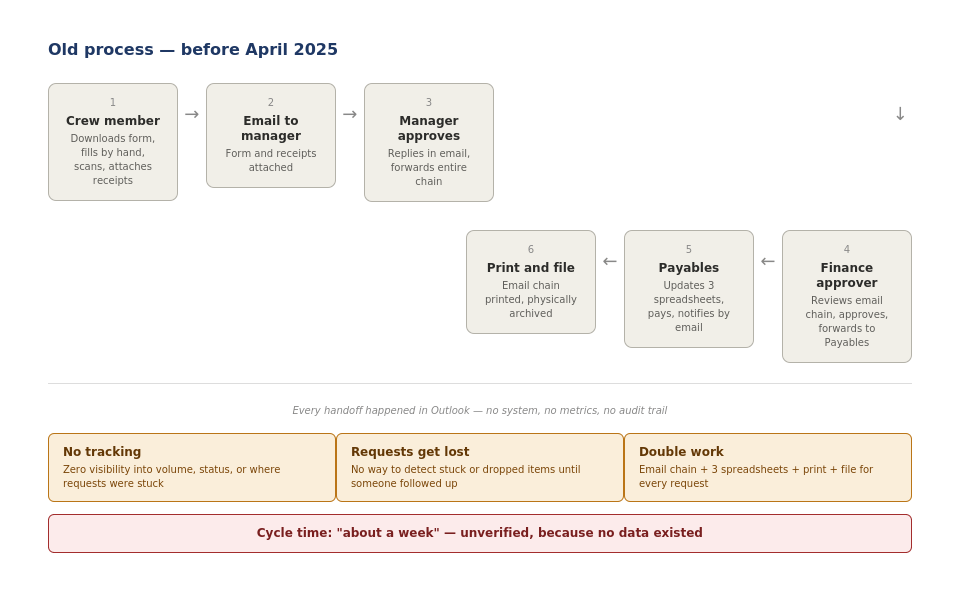
Email chains were sometimes lost. Requests would sit for days without anyone knowing they were stuck. And because nothing was tracked in a system, there was no way to know this was happening until someone followed up. Oops.
I described the core issue plainly:
| The [accounting] data resides in Excel. The workflow is entirely in Outlook. Approvals are done in email, logged in a spreadsheet, and then printed and filed. At least double work. Department heads have very little visibility into where their request is. There is zero tracking of how many requests, which departments, how long it takes. No metrics. There are at least three spreadsheets to be updated per request. |
The phrase that mattered most was ‘zero tracking.’ We couldn’t tell you how many requests came in each month, how long they took, which departments submitted the most, or how often things went wrong. Every decision about this process was made on feel. Were we too slow? Did we provide a great crew experience? Did we get everything done by Friday afternoon? I didn’t know.
| 💡 How this matters beyond finance The absence of metrics is not a finance problem: it is a systems problem. Any process that generates no structured data cannot be improved intelligently, regardless of who is running it or what tools they have access to. This applies equally to a hospital ship and a SaaS company running quarterly renewals. |
Designing the New System
When I started designing the replacement in late 2024, I evaluated several purpose-built tools: Certify, Expensify, Microix, and others. None fit well. The constraints on a hospital ship are specific: constant turnover of volunteers, small budget, and a need for something simple enough that someone in their first week could use without a manual. Microsoft 365, which every Mercy Ships crew member already has access to, was the right call. The goal was to use what we had, make the process transparent by default, and generate useful data as a natural side effect of operation rather than as an extra step.
Design principles:
- Crew first. Whatever we built had to be fair, accessible, and easy to use for the people submitting requests — nurses, engineers, deck crew, chaplains — not optimized for Finance’s convenience. If it was harder to use than sending an email, we had already failed.
- Make the right path the easy path. If submitting a request requires more effort than sending an email, people will send the email.
- Capture data automatically. Every action — submission, approval, processing, pickup — should generate a timestamp and a record without asking anyone to do extra work. Automate what you can.
- Embed controls in the workflow, not after it. The old process bolted on controls as afterthoughts. The new system would make compliance the default path.
The system runs on Office 365: Forms for submission, SharePoint as the system of record, Power Automate for routing and notifications, and Teams for approvals. Every handoff is timestamped. No printing, no email chains, no manual filing.
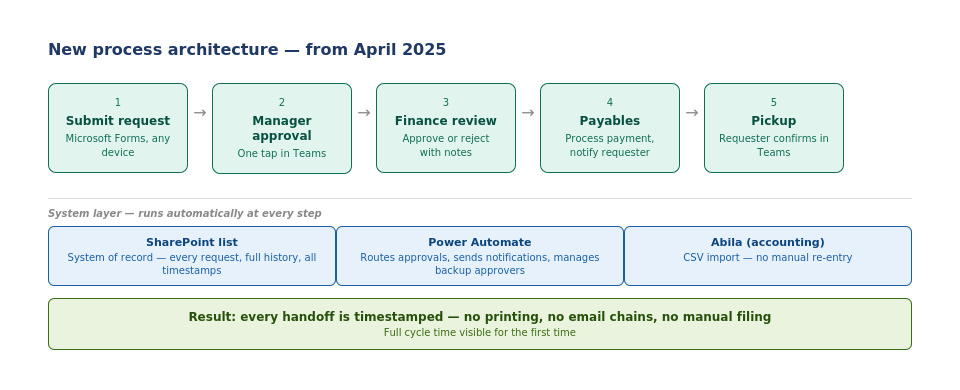
Building, Testing, and Iterating
The build began in January 2025. We formally launched in April 2025 with training, documentation, and a structured rollout to department heads. We didn’t try for perfect; we built something good enough to start generating real data, then improved from there.
A few things that came up post-launch:
- GL code errors in submissions necessitated a rewrite of our documentation and proactively educate department heads. GL codes are used to categorize expenses in the accounting system. It may sound minor, but a wrong code creates rework for payables and can affect budget reporting. The fix was upstream: better guidance at the point of submission, not corrections after the fact.
- Record retention concerns surfaced six months after launch. This included whether approved records could be modified after the fact. We worked through a solution using SharePoint version history and email logging. That conversation should have happened during design.
- Crew turnover meant Power Automate routing logic needed regular updating. We built a more maintainable approver management process to handle this.
| 💡 A lesson in iteration A launched system is more valuable than a system that is still in planning. With real users and real data, you learn things you could never have anticipated in design. Build to ship, then improve. This is as true for an Ops platform at a SaaS company as it is for a finance system on a hospital ship. |
Throughout the project, I shared what we’d built with our sister ship and our HQ. It surfaced assumptions specific to our ship and created genuine interest in expansion. As of this writing, the other ship is actively considering moving in this direction. What made that possible was the documentation and training materials we’d already built. Without those, there was nothing to share.
What I Would Do Differently
Being honest about what I’d change is more useful than presenting this as a smooth success story.
1. Define error tracking from day one.
We know roughly 15–20% of submissions require correction but we don’t have a structured log of what type of error or whether the rate is improving. Adding a ‘correction required’ flag and error type field to the SharePoint list from the start would have given us this automatically.
2. Engage HQ earlier in the design.
The record retention question surfaced six months after launch. That conversation should have happened during design. I didn’t invite the right stakeholders early enough.
3. Set a formal review cadence from day one.
The VSM analysis happened because I decided to apply the methodology eleven months in. A structured 90-day and 180-day post-launch review would have surfaced problems faster and built a habit of measurement rather than a one-time exercise.
The broader principle: constant iteration is the goal, not a perfect launch. The system that launched in April 2025 was better than what it replaced. The version we have now is better than what launched. That is how good operational systems work.
Takeaways
The most important thing this project taught us is not about expense approvals or SharePoint. It’s that a process with no (or poorly) structured data output cannot be improved intelligently whether by humans or by AI.
We built a system that fixed the workflow. As a side effect, it created trust. And trust, it turns out, is the most valuable thing you can build into any operational process.
Eleven months after launch, I applied Value Stream Mapping to analyze how the system was actually performing. What it found (and what AI made possible) is a different story.
 Jeff Beaumont